Signify - ASL Translator
Signify uses machine learning to transform webcam input into readable sign language using a variety of different techniques. The series of texts below detail the steps taken for signify to translate an image into a final word.
1. OpenCV Pipeline
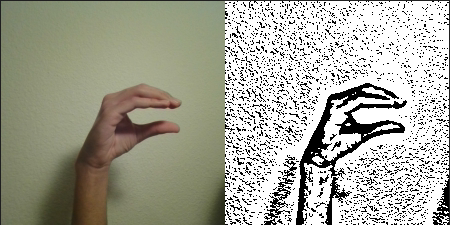
The first step of the process to transform an image to a letter output is our OpenCV pipeline. This pipeline is written as the following:cv.cvtColor(img, result, cv.COLOR_BGR2GRAY);
cv.adaptiveThreshold( result, result, 255, cv.ADAPTIVE_THRESH_GAUSSIAN_C, cv.THRESH_BINARY, 21, 2 );
cv.cvtColor(result, result, cv.COLOR_GRAY2RGB);
The above pipeline simply performs an adaptive threshold on a grayscaled version on the image, highlighting its edges which make the image easier to process through the next step, the tensorflow model.
2. Tensorflow CNN
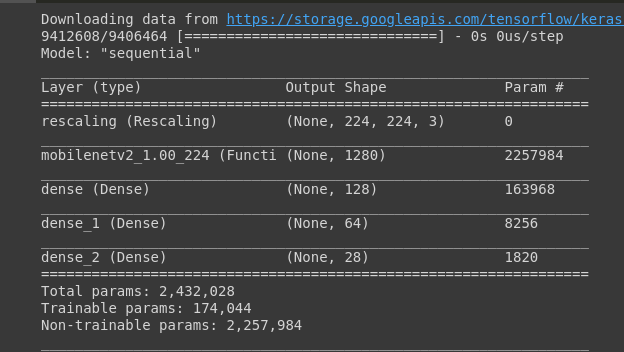
After experimenting with various different model architectures, transfer learning from various different base convolutional neural network including vgg19, alexnet, and more, we settled on the architecture shown here, which both allowed the model to be run in real time as well as be fairly accurate. We took the output of a pre-trained convolutional neural network (mobile net) and added three dense layers to alter the output to classify hand signs.
3. Interpreting The Results
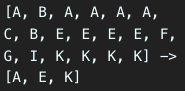
The Tensorflow CNN mentioned above only gave us a stream of outputs, which had to be translated into a readable english word / set of letters, as shown in the image. To accomplish this, we developed a small algorithm like the following: If the previous detected letter is different from the current detector letter, and the previous detected letter has been repeated at least x number of times, then add the previous letter to the running predicted word. However, the threshold x may change from letter to letter, and we had to experiment with different values of x: smaller values for letters which the model had trouble with, and larger values for letters which the model was more confident with. Then, when a space character is detected, we run autocorrection and text to speech as mentioned in the text below.
4. Autocorrection And Text To Speech
However, the letters output by the previous step were not always 100% perfect, which is why we included autocorrection. For the select times where the previous steps are not able to accurately translate a word, we use simple autocorrection to change it to the nearest english word. Additionally, we used the browser text to speech API to speak out loud the predicted word, allowing for even more use cases.